'Create the table
        Dim Table1 As DataTable
        Table1 = New DataTable

        'Add columns to it
        Table1.Columns.Add("Id", Type.GetType("System.Int32"))
        Table1.Columns.Add("Name", Type.GetType("System.String"))

        'Add rows and fill with data
        Dim EditRow As DataRow
        EditRow = Table1.NewRow()
        EditRow(0) = 1
        EditRow(1) = "John"
        Table1.Rows.Add(EditRow)
        EditRow = Table1.NewRow()
        EditRow(0) = 2
        EditRow(1) = "Jane"
        Table1.Rows.Add(EditRow)

        'Create a dataset and add this table to it
        Dim DS As DataSet
        DS = New DataSet
        DS.Tables.Add(Table1)
Crete Temporary Table on VB.NET using DataTable
Posted On //
Leave a Comment
Get value from a specific column within the LookupEdit
Posted On //
Leave a Comment
Private
MyBase
MsgBox(value.ToString)
Sub lookUpEdit1_EditValueChanged(ByVal sender As System.Object, ByVal e As System.EventArgs) HandlesMyBase
.Load Dim editor As DevExpress.XtraEditors.LookUpEdit = CType(sender,DevExpress.XtraEditors.LookUpEdit) Dim row As DataRowView = CType(editor.Properties.GetDataSourceRowByKeyValue(editor.EditValue),DataRowView) Dim value As Object = row(<aFieldName>)MsgBox(value.ToString)
End Sub
Sumber : http://community.devexpress.com/forums/p/2938/214262.aspx
Confirm Row Deletion When Using the Devexpress Gridview EmbeddedNavigator
Posted On //
Leave a Comment
- To do this, I need to handle the ButtonClick event of the embedded navigator.
- select the grid control, in the events list, I expand the EmbeddedNavigator node and doubleclick to create a handle for the ButtonClick event.
- Since the Embedded Navigator is part of the XtraEditors Library, I’m first going to add a
- reference to the DevExpress.XtraEditors namespace.
- Now I’m going to add the following code to the event handler
Private Sub GridControl1_EmbeddedNavigator_ButtonClick(ByVal sender As System.Object, ByVal e As DevExpress.XtraEditors.NavigatorButtonClickEventArgs) Handles GridControl1.EmbeddedNavigator.ButtonClick
If e.Button.ButtonType = NavigatorButtonType.Remove Then
If XtraMessageBox.Show(_LookAndFeel, "Anda yakin mau menghapus data?", Me.Text, MessageBoxButtons.YesNo, MessageBoxIcon.Question) = Windows.Forms.DialogResult.No Then
e.Handled = True
End If
End If
End Sub
Turn Off Constraints While Filling a Dataset
Posted On //
Leave a Comment
sometimes we want to turnoff the constraint on dataset. Below is syntax how to turnoff constraint on dataset
DsUniSPKAktifasi1.EnforceConstraints = False
DsUniSPKAktifasi1.EnforceConstraints = False
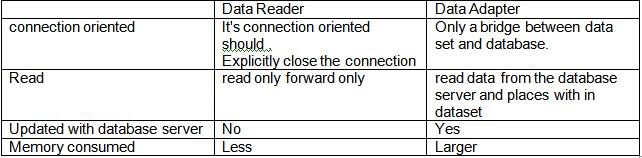
Perbedaang Fungsi DataAdapter dengan DataReader
Posted On //
Leave a Comment
Data Adapter : Berfungsi untuk mengisi dataset dan memperbaharui database.
Data Reader : Berfungsi untuk membaca data dari database secara stream dan dibaca perbaris.
Untuk melihat perbedaan secara lebih jelas, silahkan coba script sederhana di bawah:
SqlConnection con = new SqlConnection("Data Source=(local);Initial Catalog=Northwind;Integrated Security=True;");
con.Open();
SqlCommand cmd = new SqlCommand("select companyname from Customers", con);
//MENGGUNAKAN DATAADAPTER
SqlDataAdapter da = new SqlDataAdapter(cmd);DataSet ds = new DataSet();
da.Fill(ds);
dataGridView1.DataSource =ds.Tables[0];
//MENGGUNAKAN DATAREADER
SqlDataReader r =cmd.ExecuteReader();
String companyname="";
while(r.Read())
{
companyname += Convert.ToString(r["companyname"]) + Environment.NewLine;
}
MessageBox.Show(companyname);