Tampilkan postingan dengan label SQL Server. Tampilkan semua postingan

Use Pivot In SQL Query

Posted On // Leave a Comment

Introduction
This is a very simple example of Pivot query for the beginners. We use pivot queries when we need to transform data from row-level to columnar data.

Pivot query help us to generate an interactive table that quickly combines and compares large amounts of data. We can rotate its rows and columns to see different summaries of the source data, and we can display the details for areas of interest at a glance. It also help us to generate Multidimensional reporting.

Background
This post intends to help T-SQL developers get started with PIVOT queries. Most business applications will need some sort of PIVOT queries and I am sure many of you must have come across pivoting requirements several times in the past.

Using the Code
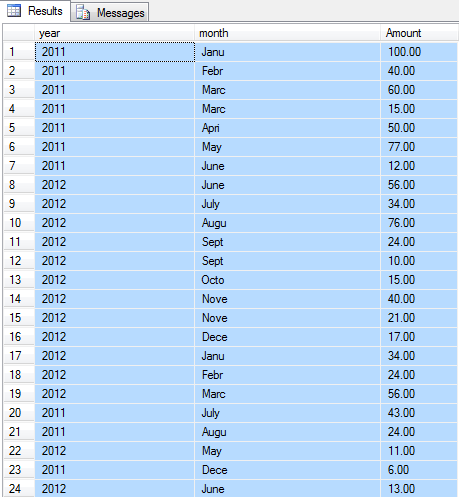
Let us have a table name Invoice which has three properties, InvoiceNumber, InvoiceDate, InvoiceAmount. Suppose we have several rows input in the table. Our goal is to display the sum of InvoiceAmount each month.

SELECT * FROM (SELECT year(invoiceDate) as [year], left(datename(month,invoicedate),3)as [month], _
InvoiceAmount as Amount FROM Invoice) as InvoiceResult 


SELECT *
FROM (
    SELECT 
        year(invoiceDate) as [year],left(datename(month,invoicedate),3)as [month], 
        InvoiceAmount as Amount 
    FROM Invoice
) as s
PIVOT
(
    SUM(Amount)
    FOR [month] IN (jan, feb, mar, apr, 
    may, jun, jul, aug, sep, oct, nov, dec)
)AS pivot


[Read more]

How to split a comma-separated value to columns

Posted On // Leave a Comment

TO COLUMNS

SELECT 
 [Value]
 ,Substring(FullName, 1,Charindex(',', FullName)-1)    AS [Name]
 ,Substring(FullName, Charindex(',', FullName)+1, LEN(FullName)) AS  Surname
FROM 
 Table1

SPLIT TO ROW

CREATE FUNCTION Split (
      @InputString                  VARCHAR(8000),
      @Delimiter                    VARCHAR(50)
)

RETURNS @Items TABLE (
      Item                          VARCHAR(8000)
)

AS
BEGIN
      IF @Delimiter = ' '
      BEGIN
            SET @Delimiter = ','
            SET @InputString = REPLACE(@InputString, ' ', @Delimiter)
      END

      IF (@Delimiter IS NULL OR @Delimiter = '')
            SET @Delimiter = ','

--INSERT INTO @Items VALUES (@Delimiter) -- Diagnostic
--INSERT INTO @Items VALUES (@InputString) -- Diagnostic

      DECLARE @Item                 VARCHAR(8000)
      DECLARE @ItemList       VARCHAR(8000)
      DECLARE @DelimIndex     INT

      SET @ItemList = @InputString
      SET @DelimIndex = CHARINDEX(@Delimiter, @ItemList, 0)
      WHILE (@DelimIndex != 0)
      BEGIN
            SET @Item = SUBSTRING(@ItemList, 0, @DelimIndex)
            INSERT INTO @Items VALUES (@Item)

            -- Set @ItemList = @ItemList minus one less item
            SET @ItemList = SUBSTRING(@ItemList, @DelimIndex+1, LEN(@ItemList)-@DelimIndex)
            SET @DelimIndex = CHARINDEX(@Delimiter, @ItemList, 0)
      END -- End WHILE

      IF @Item IS NOT NULL -- At least one delimiter was encountered in @InputString
      BEGIN
            SET @Item = @ItemList
            INSERT INTO @Items VALUES (@Item)
      END

      -- No delimiters were encountered in @InputString, so just return @InputString
      ELSE INSERT INTO @Items VALUES (@InputString)

      RETURN

END -- End Function
GO

---- Set Permissions
--GRANT SELECT ON Split TO UserRole1
--GRANT SELECT ON Split TO UserRole2
--GO

SUMBER :http://stackoverflow.com/questions/10581772/how-to-split-a-comma-separated-value-to-columns
[Read more]

Mendapatkan Urutan Baris pada SQL Server

Posted On // Leave a Comment

Perintah SQL berikut bisa digunakan untuk mendapatkan nilai baris pada sql server.


SELECT 
fdate
,title
,id
,row_number() OVER (ORDER BY id ASC) as baris
FROM articles
WHERE category_id = 8
ORDER BY fdate
[Read more]

Mendapatkan Nilai Running Total Pada SQL Server

Posted On // Leave a Comment
Perintah running total pada sql server ini biasanya digunakan pada saat kita ingin melihat nilai mutasi saldo suatu transaksi yang terus bertambah.

SQL Server 2005
select
    t.id ,
    t.somedate ,
    t.somevalue ,
    rt.runningTotal
from TestTable t
 cross apply (select sum(somevalue) as runningTotal
       from TestTable
       where somedate <= t.somedate
      ) as rt
order by t.somedate


SQL Server 2012
select
    t.id ,
    t.somedate ,
    t.somevalue ,
    rt.runningTotal
from TestTable t
 cross apply (select sum(somevalue) as runningTotal
       from TestTable
       where somedate <= t.somedate
      ) as rt
order by t.somedate
[Read more]

Muncul Save Changes Is Not Permitted Saat Menyimpan Peruba,pan Table di SQL Server 2008

Posted On // Leave a Comment
Ikuti langkah-langkah berikut jika muncul pesan "Saving changes is not permitted" saat kita akan menyimpan perubahan tabel di SQL Server 2008.


  1. Klik menu Tools > Options
  2. pada jendela Options, expand Designer > Table and Database Desingers
  3. hilangkan ceklist pada tulisan "Prevent saving changes that require table re-creation"
  4. klik OK dan coba untuk menyimpan kembali tabel yang sebelumnya tidak bisa disimpan.
[Read more]

Pentingnya Integrity Constraint Dalam Struktur Database

Posted On // 2 comments
Sebetulnya ini adalah copy-paste hasil diskusi group PHP Indonesia di Facebook, yang sengaja saya pajang di sini karena mungkin berguna (buat saya) sekali buat menambah pemahaman mengenai Integrity Constraint.


SEBERAPA PENTING nya
- INTEGRITY CONSTRAINT didalam struktur database.
- Kapan kita menggunakan Integrity Constraint ?
- Property Description pada sebuah Field atau Table.
Pertanyaan ini diajukan oleh Komar Satriani


Dan berikut adalah tanggapan dari Pak Dedi Widharwanto

Kalo menurut pak Kent Milligan (ini mbahnya DB2 on IBM i) salah satu pentingnya menggunakan integrity constraint adalah ketika database yang kita bangun diakses oleh lebih dari satu aplikasi dan mungkin juga cara aksesnya berbeda-beda (akses langsung, JDBC, ODBC atau cara lain).

Jika tidak menggunakan integrity constraint semua logic ada di aplikasi... artinya jika aplikasinya ada 10 maka semua aplikasi tersebut harus memiliki business logic yang tepat. Dengan menggunakan constraint di DB maka kita tidak perlu lagi memikirkan logic tersebut di masing2x aplikasi karena DBnya udah mengatur sendiri.

Ini sebagian tulisan dia:
Many AS/400 databases were designed to be updated by a single set of application programs. For such databases, the application performed all integrity checks (e.g., Is a state abbreviation valid?). As systems evolve, however, databases are being accessed through many new mechanisms: ODBC, Java programs, Web pages, and more. Thus, it's important to migrate as many RPG integrity checks as possible into the database itself via constraints and referential integrity. Note that in cases where multiple applications can update the same data, all the applications must explicitly enforce integrity checks - a high-maintenance, error-prone approach that still may not cover all interfaces.

Kalo mau lihat ulasan yg lengkap ada di sini
http://www-03.ibm.com/systems/i/software/db2/todba.html

Mas Komar Satriani, sebenarnya secara umum IC bisa membantu semua programmer membuat aplikasi karena untuk beberapa urusan yang bisa ditangani IC tidak perlu dimasukan lagi ke dalam aplikasi/programnya. Sehingga aplikasinya lebih ringkas dan umumnya berdampak ke performance juga.

Jadi sebenarnya bukan penting atau tidak... tapi jika kita bisa membuat aplikasi yg ringkas dengan performance yg baik maka aplikasi tersebut pasti akan disukai oleh penggunanya...

Pengalaman saya berurusan di dunia perbankan adalah setiap 3-5 tahun sekali sebagian besar customer saya ganti sistem hanya untuk meningkatkan performance sistem dan aplikasinya... ini cara yg paling mudah dilakukan dibandingkan cara yg kedua di bawah ini...

cara lain yg lebih sulit... melihat/membongkar cara aplikasinya bekerja dan merubah logic programming... (hehehe... kalo yg buat aplikasi masih ada.. dan masih inget kenapa dia membuat logic seperti itu ketika dia buat aplikasinya..)

Aplikasi di perbankan (terutama yg kritikal) memang tidak di harapkan sering fail... karena dampaknya kemana mana sih...

klik disini Untuk melihat diskusi lengkapnya,
[Read more]

Membuat Unique Constraint pada kolom di SQL Server

Posted On // Leave a Comment

ALTER TABLE ADD CONSTRAINT
            UNIQUE NONCLUSTERED
    (
               
    )

create unique constraint on sql server
[Read more]

Penggunaan CASE WHEN Pada SQL Server

Posted On // Leave a Comment
Judul sebelumnya dari artikel ini adalah Case expressions may only be nested to level 10 SQL Error, error ini terjadi karena penggunaan case yang lebih dari 10. Untuk mempermudah pencarian, saya ganti title nya :P.


CASE WHEN SUBSTRING(PERIODE,5,2) = 01 THEN 'JAN-' + @TAHUN
ELSE CASE WHEN SUBSTRING(PERIODE,5,2) = 02 THEN 'FEB-' + @TAHUN
ELSE CASE WHEN SUBSTRING(PERIODE,5,2) = 03 THEN 'MAR-' + @TAHUN
ELSE CASE WHEN SUBSTRING(PERIODE,5,2) = 04 THEN 'APR-' + @TAHUN
ELSE CASE WHEN SUBSTRING(PERIODE,5,2) = 05 THEN 'MEI-' + @TAHUN
ELSE CASE WHEN SUBSTRING(PERIODE,5,2) = 06 THEN 'JUN-' + @TAHUN
ELSE CASE WHEN SUBSTRING(PERIODE,5,2) = 07 THEN 'JUL-' + @TAHUN
ELSE CASE WHEN SUBSTRING(PERIODE,5,2) = 08 THEN 'AUG-' + @TAHUN
ELSE CASE WHEN SUBSTRING(PERIODE,5,2) = 09 THEN 'SEP-' + @TAHUN
ELSE CASE WHEN SUBSTRING(PERIODE,5,2) = 10 THEN 'OCT-' + @TAHUN
-- ELSE CASE WHEN SUBSTRING(PERIODE,5,2) = 11 THEN 'NOV-' + @TAHUN
ELSE 'DEC-' + @TAHUN
END END END END END END END END END END

ELSE 'DEC-' + @TAHUN
END

Saat saya meggunakan script di atas, maka muncul pesan error "Case expressions may only be nested to level 10" karena maksimum untuk syntax nested "Case" adalah 10 level.

Ternyata syntax yang benar adalah sebagai berikut:

CASE WHEN SUBSTRING(PERIODE,5,2) = 01 THEN 'JAN-' + @TAHUN
WHEN SUBSTRING(PERIODE,5,2) = 02 THEN 'FEB-' + @TAHUN
WHEN SUBSTRING(PERIODE,5,2) = 03 THEN 'MAR-' + @TAHUN
WHEN SUBSTRING(PERIODE,5,2) = 04 THEN 'APR-' + @TAHUN
WHEN SUBSTRING(PERIODE,5,2) = 05 THEN 'MEI-' + @TAHUN
WHEN SUBSTRING(PERIODE,5,2) = 06 THEN 'JUN-' + @TAHUN
WHEN SUBSTRING(PERIODE,5,2) = 07 THEN 'JUL-' + @TAHUN
WHEN SUBSTRING(PERIODE,5,2) = 08 THEN 'AUG-' + @TAHUN
WHEN SUBSTRING(PERIODE,5,2) = 09 THEN 'SEP-' + @TAHUN
WHEN SUBSTRING(PERIODE,5,2) = 10 THEN 'OCT-' + @TAHUN
WHEN SUBSTRING(PERIODE,5,2) = 11 THEN 'NOV-' + @TAHUN
ELSE 'DEC-' + @TAHUN
END

perhatikan bawha pada script kedua, syntax ELSE CASE tidak di tulis
[Read more]

Attach File pada SQL Server menggunakan QUERY

Posted On // Leave a Comment

CREATE DATABASE MvcMusicStore
ON (FILENAME = 'D:\App_Data\MvcMusicStore.mdf'),
(FILENAME = 'D:\App_Data\MvcMusicStore_log.ldf')
FOR ATTACH;
GO

[Read more]

SQL Server 2008 R2 Operating Sytem Error 5 saat Restore dan Attach Database

Posted On // Leave a Comment
SQL Server error
Okey, ini pertama kali saya dengan terpaksa harus install SQL Server 2008 R2 karena kantor saya memakai aplikasi tersebut.

Pada saat proses installasi tidak ada masalah sampai saya berusaha untuk attach database yang ada. pesan errornya adalah : "unable to open the physical file "file name". operating system error 5: ..."


cara untuk menangani error tersebut adalah:

  1. start > run > ketikan services.msc > ok
  2. Cari services SQL server pada jendela Services > Klik Kanan > Properties
  3. Pilih tab Log On > Local System Account > OK
  4. kembali lagi ke jendela services & pilih SQL Server > klik  restart
Coba ulangin restore / attach database Anda. Cara ini berhasil, setidaknya untuk saya)


[Read more]

Looping pada SQL Server

Posted On // Leave a Comment


1) Example of WHILE Loop
DECLARE @intFlag INT
SET @intFlag = 1
WHILE (@intFlag <=5)
BEGIN
PRINT @intFlag
SET @intFlag = @intFlag + 1
END
GO

ResultSet:
1
2
3
4
5

2) Example of WHILE Loop with BREAK keyword
DECLARE @intFlag INT
SET @intFlag = 1
WHILE (@intFlag <=5)
BEGIN
PRINT @intFlag
SET @intFlag = @intFlag + 1
IF @intFlag = 4
BREAK;
END
GO

ResultSet:
1
2
3

3) Example of WHILE Loop with CONTINUE and BREAK keywords
DECLARE @intFlag INT
SET @intFlag = 1
WHILE (@intFlag <=5)
BEGIN
PRINT @intFlag
SET @intFlag = @intFlag + 1
CONTINUE;
IF @intFlag = 4 -- This will never executed
BREAK;
END
GO

ResultSet:
1
2
3
4
5

sumber : http://blog.sqlauthority.com/2007/10/24/sql-server-simple-example-of-while-loop-with-continue-and-break-keywords/
[Read more]

Penggunaan Stored Procedure dan Sql Data Adapter pada vb.net

Posted On // Leave a Comment
Dim conn As New SqlConnection(strConn)
Dim cmd As New SqlCommand("MyStoredProcedure", conn)
With cmd
    .CommandType = CommandType.StoredProcedure
    .Parameters.Add("@pdata", SqlDbType.VarChar, 100)
    .Parameters("@pdata").Value = "Whatever"
End With
Dim da As New SqlDataAdapter(cmd)
Dim ds As New DataSet
da.Fill(ds)
[Read more]

Perbedaan syntax SQL Server dan mySQL

Posted On // Leave a Comment
Menggabungkan String


SQL Server : 
SELECT Nama = 'Taufik' + 'Lukman'
Nama = 'TaufikLukman'

mySQL:
SELECT CONCAT('Taufik','Lukman') AS Nama
Nama ='Taufik Lukman'

Mendapatkan Tanggal & Jam
SQL Server : 
SELECT GETDATE() as Tanggal
Tanggal = 2012-03-06 11:46:06

mySQL:
SELECT SYSDATE() as Tanggal
Tanggal = 2012-03-06 11:46:06
[Read more]

Update Database From DevExpress GridControl

Posted On // Leave a Comment
After spend hours in google, finaly I got answer about how to update database when my GridControl is updated or inserted a new row. the code is really simple, but not as simple as find the right keyword to google it ;).

So here's the few code


Private Sub __UpdateMasterJasa(ByVal grid As DevExpress.XtraGrid.GridControl)

        Try
            'save the latest changes
            Dim view As ColumnView = grid.FocusedView
            If Not (view.PostEditor() And view.UpdateCurrentRow) Then Return

            'Update the database's Jasa table to which SQLDataAdapter DAMstJasa is connected
            DAMstJasa.Update(DS.Tables("MstJasa"))

        Catch ex As Exception

            MsgBox(ex.Message)

        End Try

    End Sub

Enjoy ;)
[Read more]

Mencari Data Duplikat Menggunakan SQL

Posted On // Leave a Comment
Berikut adalah contoh query untuk menemukan duplikasi data pada suatu kolom,

SELECT email,
 COUNT(email) AS NumOccurrences
FROM users
GROUP BY email
HAVING ( COUNT(email) > 1 )

gunakan query berikut untuk menemukan data yang tidak memiliki duplikat


SELECT email
FROM users
GROUP BY email
HAVING ( COUNT(email) = 1 )

sumber : http://www.petefreitag.com
[Read more]

SQL Server INFORMATION_SCHEMA Query

Posted On // Leave a Comment
seperti syntaxnya, INFORMATION_SCHEMA pada SQL Server berfungsi untuk menampilkan skema & informasi (properties) dari suatu table, kolom, views dll. Berikut adalah contoh syntax dan tampilannya:

SELECT *
FROM INFORMATION_SCHEMA.TABLES
WHERE TABLE_CATALOG = 'ADMS3'


SELECT
*
FROM
INFORMATION_SCHEMA.COLUMNS
WHERE
TABLE_CATALOG = 'ADMS3'
AND TABLE_NAME = 'uniAlokasi'


SELECT
*
FROM
INFORMATION_SCHEMA.ROUTINES


SELECT
*
FROM
INFORMATION_SCHEMA.parameters

[Read more]

Round, Ceiling, Floor Function on MS SQL Server

Posted On // Leave a Comment
ROUND(), CEILING() and FLOOR() Examples
ExampleValue
In this example you can see with a positive integer all three rounding functions return the same value.
DECLARE @value int
SET
 @value = 6
SELECT
 ROUND(@value, 1)SELECT CEILING(@value)SELECT FLOOR(@value)


6
6
6
In the second example even with a negative integer all three rounding functions return the same value.
DECLARE @value int
SET
 @value = -11

SELECT
 ROUND(@value, 1) 
SELECT
 CEILING(@value)
SELECT
 FLOOR(@value)


-11
-11
-11
To prove the point with an integer, rounding is not possible.  Let's check out some other data types.
DECLARE @value int
SET
 @value = -11.5
SELECT ROUND(@value, 2) 
SELECT
 CEILING(@value)
SELECT
 FLOOR(@value)


-11
-11
-11
With a decimal data type and the ROUND function with various length parameters (i.e. 1, 2 or 3) yields different final values in our example.  The 5 in the second digit to the right of the decimal point is significant when the length parameter is 1 when rounding the value.  In addition, with the decimal data type the CEILING and FLOOR functions take the decimal places into consideration for differing values as well.
DECLARE @value decimal(10,2)SET @value = 11.05

SELECT
 ROUND(@value, 1) SELECT ROUND(@value, 2)SELECT ROUND(@value, 3)SELECT CEILING(@value)SELECT FLOOR(@value)


11.10
11.05
11.05
12
11
As is the case with the example above, the 6 in the second digit to the right of the decimal place is significant based on the various length parameters.
DECLARE @value decimal(10,2)SET @value = -14.46

SELECT
 ROUND(@value, 1) SELECT ROUND(@value, 2)SELECT ROUND(@value, 3)SELECT CEILING(@value)SELECT FLOOR(@value)


-14.50
-14.46
-14.46
-14
-15
This example helps to illustrate the break down of rounded values across.  This example also proves the point that the CEILING and FLOOR functions round to the nearest integer.
DECLARE @value decimal(10,10)
SET
 @value = .5432167890

SELECT
 ROUND(@value, 1) 
SELECT
 ROUND(@value, 2)
SELECT
 ROUND(@value, 3)
SELECT
 ROUND(@value, 4)
SELECT
 ROUND(@value, 5)
SELECT
 ROUND(@value, 6)
SELECT
 ROUND(@value, 7)
SELECT
 ROUND(@value, 8)
SELECT
 ROUND(@value, 9)
SELECT
 ROUND(@value, 10)
SELECT
 CEILING(@value)
SELECT
 FLOOR(@value)


0.5000000000
0.5400000000
0.5430000000
0.5432000000
0.5432200000
0.5432170000
0.5432168000
0.5432167900
0.5432167890
0.5432167890
1
0
In the final example, with a float data type you can see the same type of behavior as was the case with the decimal example above.  In addition, the CEILING and FLOOR functions round to the nearest integer.
DECLARE @value float(10)
SET
 @value = .1234567890

SELECT
 ROUND(@value, 1) 
SELECT
 ROUND(@value, 2)
SELECT
 ROUND(@value, 3)
SELECT
 ROUND(@value, 4)
SELECT
 ROUND(@value, 5)
SELECT
 ROUND(@value, 6)
SELECT
 ROUND(@value, 7)
SELECT
 ROUND(@value, 8)
SELECT
 ROUND(@value, 9)
SELECT
 ROUND(@value, 10)
SELECT
 CEILING(@value)
SELECT
 FLOOR(@value)


0.1
0.12
0.123
0.1235
0.12346
0.123457
0.1234568
0.12345679
0.123456791
0.123456791
1
0
[Read more]

MS SQL Transaction & vbNET

Posted On // Leave a Comment
Public  _SQLTransact As SqlTransaction

Function __Simpan() As Boolean
        Dim dtUpdate As Date
        Dim strNomor As String = __GetNomor()
        dtUpdate = _uniGudang._GetDateTime
        _SQLTransact = _SQLConnection.BeginTransaction
        _SQLCommand.Transaction = _SQLTransact
        Try
            __Simpan = True
            With _SQLCommand
                .CommandText = "uniMutasiGudang_INSERT"
                .Parameters.Clear()
                .Parameters.Add("@MerekID", SqlDbType.Int).Value = intMerekID
                .Parameters.Add("@TipeID", SqlDbType.Int).Value = intTipeID
                .Parameters.Add("@WarnaID", SqlDbType.Int).Value = intWarnaID
                .Parameters.Add("@TahunProduksi", SqlDbType.NVarChar, 4).Value = txtTahunProduksi.EditValue
                .Parameters.Add("@NomorRangka", SqlDbType.NVarChar, 20).Value = cboNomorRangka.EditValue
                .Parameters.Add("@NomorMesin", SqlDbType.NVarChar, 20).Value = txtNomorMesin.Text
                .Parameters.Add("@Tanggal", SqlDbType.DateTime).Value = dtTanggal.EditValue
                .Parameters.Add("@Nomor", SqlDbType.NVarChar, 16).Value = strNomor
                .Parameters.Add("@DariKepadaCabangID", SqlDbType.Int).Value = cboDariKepadaID.Text
                .Parameters.Add("@DariKepada", SqlDbType.NVarChar, 50).Value = cboDariKepada.Text
                .Parameters.Add("@PetugasGudang", SqlDbType.NVarChar, 20).Value = txtPetugasGudang.Text
                .Parameters.Add("@Driver", SqlDbType.NVarChar, 20).Value = txtDriver.Text
                .Parameters.Add("@Lokasi", SqlDbType.NVarChar, 20).Value = txtLokasiParkir.Text
                .Parameters.Add("@Keterangan", SqlDbType.NVarChar, 255).Value = txtKeterangan.Text
                .Parameters.Add("@Status", SqlDbType.NVarChar, 20).Value = "OPEN"
                .Parameters.Add("@FDate", SqlDbType.DateTime).Value = dtUpdate
                .Parameters.Add("@FUserID", SqlDbType.NVarChar, 20).Value = _UserID
                .Parameters.Add("@LDate", SqlDbType.DateTime).Value = dtUpdate
                .Parameters.Add("@LUserID", SqlDbType.NVarChar, 20).Value = _UserID
                .ExecuteNonQuery()
            End With
            XtraMessageBox.Show("Transaksi berhasil disimpan", "Simpan", MessageBoxButtons.OK, MessageBoxIcon.Information)
            _SQLTransact.Commit()
        Catch ex As Exception
            __Simpan = False
            _SQLTransact.Rollback()
            MsgBox(ex.Message)
        End Try

    End Function

keyword : executenonquery requires the command to have a transaction...
[Read more]

Simple ADO.NET connection

Posted On // Leave a Comment
Public _ADOConnectionString As String = "provider=SQLOLEDB;Data Source=192.168.10.28" & _
                                ";Initial Catalog=ADMS3;Persist Security Info=True;User ID=sa;Password=creator;"

Public _
        _ADOConnection As New OleDb.OleDbConnection

Try
            _ADOConnection.ConnectionString = _ADOConnectionString
            _ADOConnection.Open()

        Catch ex As Exception
            MsgBox(ex.Message)
        End Try

Dim strSQL As String = "SELECT ISNULL(MAX(SUBSTRING(Nomor,9,8)),0) AS Nomor FROM uniMutasiGudang " & _
                               "WHERE SUBSTRING(Nomor,5,2) = '" & VB.Left(cboCabang.EditValue, 2) & "'"
        Dim OLEDBCommand As OleDbCommand = New OleDbCommand(strSQL, _ADOConnection)
        Dim __ADOReader As OleDbDataReader = OLEDBCommand.ExecuteReader


While __ADOReader.Read
            intNomor = CInt(__ADOReader("Nomor"))
        End While
        __ADOReader.Close()
[Read more]

Backup SQL Server melalui query

Posted On // Leave a Comment

Backups

Microsoft, in SQL Server Books Online, defines backups as:
A copy of data that is used to restore and recover data after a system failure
SQL Backups can be created a number of ways and can incorporate all or some of the data, as well as some part of the transaction log. While this article is focused on 2005 syntax, most of the concepts are applicable to 2000. This is a huge topic. At best, I'm going to scratch the surface and give you enough information so you won't start crying again. After reading this, you should be able to set up a reasonable set of backups for your system.

Recovery Models

In order to begin working on backups, the business needs define a database recovery model. In essence, arecovery model defines what you're going to do with the transaction log data.
There are three recovery models: Full, Simple and Bulk Logged. These are pretty easy to define:
  • Simple – in simple recovery mode, the transaction log is not backed up so you can only recover to the most recent full or differential backup.
  • Full – in full recovery mode you backup the database and the transaction log so that you can recover the database to any point in time.
  • Bulk Logged – in bulk logged mode, most transactions are stored in the transaction log, but some bulk operations such as bulk loads or index creation are not logged.
The two most commonly used modes are Simple and Full. Don't necessarily assume that, of course, you always need to use Full recovery to protect your data. It is a business decision. The business is going to tell you if you need to recover to a point in time or if you simply need the last full backup. It's going to define if your data is recoverable by other means, such as manual entry, or if you have to protect as much as possible as it comes across the wire. You use Simple recovery if you can afford to lose the data stored since the last full or differential backup and/or you just don't need recovery to a point in time. In Simple mode, you must restore all secondary read/write file groups when you restore the primary. You use Simple mostly on secondary databases that are not an absolute vital part of the enterprise or reporting systems, with read only access so there isn't a transaction log to worry about anyway. You use Full if every bit of the data is vital, you need to recover to a point in time or, usually in the case of very large databases (VLDB), you need to restore individual files and file groups independently of other files and file groups.
With both Simple and full recovery models, you can now run a Copy-Only backup which allows you to copy the database to a backup file, but doesn't affect the log, differential backup schedules or impact recovery to a point in time. I'll try to drill down on as many of these topics as possible through the article, but not the files and filegroups.

Working with Simple Recovery

Enough talk. Let's get down to running backups. Let's assume that we're in Simple recovery on a small to mid-sized database. I'm going to use AdventureWorks for all the sample scripts. To set it to simple recovery:

ALTER DATABASE AdventureWorks SET RECOVERY SIMPLE

Your simplest backup strategy is to run, at regular intervals, the following SQL Server backup command, which will perform a full backup of the database:

BACKUP DATABASE AdventureWorks
TO DISK = 'C:\Backups\AdventureWorks.BAK'

What's with all the typing you ask? Don't we have GUI tools to handle the work for us? Yes, most simple backups can be performed using SQL Server Management Studio. However, if you want to learn and understand what Management Studio is doing for you, or if you want some fine grained control over what is backed up, how and where, then you're going to have to break out the keyboard and put away the mouse.
The above command will precipitate a basic backup to disk. Most DBAs I know backup to file and then scrape the files onto a tape or some other media. This is because files on disk are simple and quick to recover, whereas media can sometimes be a bit of a pain. For example, we generally have two to three days worth of backups on our file systems for immediate recovery. We only go to the tape systems if we need to run restores for older backups.
What did that command do? It made a copy of all the committed data in the database. It also copied uncommitted log entries. These are used during recovery to either commit or rollback changes that occurred to the data during the backup process.

Copy-only backups

Normally, backing up a database affects other backup and restore processes. For example after running the previous command, any differential backups (a backup that only copies data changed since the last backup) would be using this as the starting point for data changes, not the backup you ran last night. As noted earlier, SQL 2005 introduces a new concept to backups, COPY_ONLY backups, which allow us to keep from interrupting the cycle:
BACKUP DATABASE AdventureWorks
TO DISK = 'C:\Backups\AdventureWorks.bak' 
WITH COPY_ONLY;
Already we've found one of those more granular moments when the Management Studio wouldn't help you. If you want a copy only backup, you have to use the command line.

Differential backups
Let's assume for a moment, that we're still in simple recovery, but we're dealing with a larger database, say something above 100 GB in size. Full backups can actually start to slow down the process a bit. Instead, after consultation with the business, we've decided to do a weekly full backup and daily differential backups. Differentialbackups only backup the data pages that have changed since the last full backup. Following is the SQL backup command to perform a differential backup:
BACKUP DATABASE AdventureWorks
TO DISK = 'C:\backups\AdventureWorks.bak' 
WITH DIFFERENTIAL;

Now, if we had to restore this database, we'd first go to the last full backup, restore that, and then restore the differential backups in order (more on that later).
BACKUP DATABASE Adventureworks
TO DISK = 'C:\backups\AdventureWorks.bak'
WITH INIT;
There are a number of other backup options that I won't be detailing here. Read the books online to see details onBLOCKSIZE, EXPIREDATE, RETAINDAYS, PASSWORD, NAME, STATS, and so on.
You can also run a statement that will check the integrity of a database backup. It doesn't check the integrity of the data within a backup, but it does verify that the backup is formatted correctly and accessible.
RESTORE VERIFYONLY
FROM DISK = 'C:\backups\Adventureworks.bak'

Full recovery and log backups

We've primarily been working on a database that was in Simple recovery mode (this used to be called Truncate Log on Checkpoint). In this mode, we do not backup the transaction logs for later recovery. Every backup under this mechanism is a database backup. Log backups are simply not possible.
However, you've only protected the data as of the last good backup, either full or differential. Let's change our assumptions. Now we're dealing with a large, mission critical application and database. We want to be able to recover this database up to the latest minute. This is a very important point. In theory, since the log entries are being stored and backed up, we're protected up to the point of any failure. However, some failures can cause corruption of the log, making recovery to a point in time impossible. So, we have to determine what the reasonable minimum time between log backups will be. In this case we can live with no more than 15 minutes worth of lost data.
So, let's start by putting our database in FULL recovery mode:
ALTER DATABASE AdventureWorks SET RECOVERY FULL
Then, on a scheduled basis, in this case every 15 minutes, we'll run the SQL backup command for the transaction log:
BACKUP LOG Adventureworks
TO DISK = 'C:\backups\AdventureWorks_Log.bak';
This script will backup committed transactions from the transaction log. It has markers in the file that show the start and stop time. It will truncate the log when it successfully completes, cleaning out from the transaction log the committed transactions that have been written to the backup file. If necessary, you can use the WITHNO_TRUNCATE statement to capture data from the transaction log regardless of the state of the database, assuming it's online and not in an EMERGENCY status. This is for emergencies only.
Note that we are not using the INIT statement in this case, but you can do so if you choose. When doing log backups, you've got options:
  1. Run all the backups to a single file, where they'll stack and all you have to do, on restore (covered later), is cycle through them.
  2. Name the backups uniquely, probably using date and time in the string.
In that latter case, safety says, use INIT because you're exercising maximum control over what gets backed up where, and you'll be able to know exactly what a backup is, when it was taken and from where based on the name. This is yet another place where operating backups from the command line gives you more control than the GUI. We've used both approaches in our systems for different reasons. You can decide what is best for your technology and business requirements.
Most of the options available to the database backup are included in Log backup, including COPY_ONLY. This would allow you to capture a set of transaction data without affecting the log or the next scheduled log backup. This would be handy for taking production data to another system for troubleshooting etc.
If you have your database set to FULL Recovery, you need to run log backups. Sometimes, people forget and the transaction log grows to the point that it fills up the disk drive. In this case, you can run:
BACKUP LOG Adventureworks WITH NO_LOG;
Attaching NO_LOG to the log backup, and not specifying a location for the log, causes the inactive part of the log to be removed and it does this without a log entry itself, thus defeating the full disk drive. This is absolutely not recommended because it breaks the log chain, the series of log backups from which you would recover your database to a point in time. Microsoft recommends running a full backup immediately after using this statement. Further, they're warning that this statement may be deprecated in a future release.

Restoring Databases

As important as SQL Server backups are, and they are vital, they are useless without the ability to restore the database.

Restoring a full database backup

Restoring a full database backup is as simple as it was to create:
RESTORE DATABASE Adventureworks
FROM DISK = 'C:\Backup\AdventureWorks.bak';
It's really that simple – unless, as we we are backing up everything to a file as if it were a backup device. In that case, you'll need to specify which file within the "device" you're accessing. If you don't know which file, you'll need to generate a list:
RESTORE HEADERONLY
FROM DISK = 'C:\Backup\Adventureworks.bak';
This will give you the same list as I showed above from Management Studio. So now, if we wanted to restore the second file in the group, the COPY_ONLY backup, you would issue the following command:
RESTORE DATABASE AdventureWorks
FROM DISK = 'C:\Backup\Adventureworks.bak'
WITH FILE = 2;
Unfortunately, if you're following along, you may find that you just generated this error:
Msg 3159, Level 16, State 1, Line 1
The tail of the log for the database "AdventureWorks" has not been backed up.
Use BACKUP LOG WITH NORECOVERY to backup the log if it contains work you do
not want to lose. Use the WITH REPLACE or WITH STOPAT clause of the RESTORE
statement to just overwrite the contents of the log.
Msg 3013, Level 16, State 1, Line 1
RESTORE DATABASE is terminating abnormally.
What this means is, that your database is in full recovery mode, but you haven't backed up the "tail of the log", meaning the transactions entered since the last time you ran a backup. You can override this requirement if you change the previous syntax to:
RESTORE DATABASE AdventureWorks
FROM DISK = 'C:\Backups\Adventureworks.bak'
WITH FILE = 2,
REPLACE;
That's the first time we've stacked the WITH clauses (WITH FILE=2 and WITH REPLACE is represented as WITH FILE=2, REPLACE), but it won't be the last. Read through the books online. Most of the WITH clause statements can be used in combination with the others.
What happens if we want to restore to a different database than the original? For example, we want to make a copy of our database from a separate backup. Maybe we want to move it down to a production support server where we are going to do some work on it, separate from the production copy of the database. If we take the simple approach, well, try this:
RESTORE DATABASE AdventureWorks_2
FROM DISK = 'C:\Backups\Adventureworks.bak'
WITH FILE = 2;
In this case, you should see a whole series of errors relating to files not being overwritten. You really can create new databases from backups, but if you're doing it on a server with the existing database, you'll need to change the location of the physical files using the logical names. In order to know the logical names of the files for a given database, run this prior to attempting to move the files:
RESTORE FILELISTONLY
FROM DISK = 'C:\Backups\Adventureworks.bak'
WITH FILE = 2;
This can then be used to identify the appropriate logical names in order to generate this script:
RESTORE DATABASE AdventureWorks_2
FROM DISK = 'C:\Backups\Adventureworks.bak'
WITH FILE = 2,
   MOVE 'AdventureWorks_Data' TO 'C:\backups\aw2_data.mdf',
   MOVE 'AdventureWorks_Log' TO 'C:\backups\aw2_log.ldf';

Restoring a differential backup

The last method is to apply the differential backup. This requires two steps. First, we'll restore the database, but with a twist and then we'll apply the differential backup:
RESTORE DATABASE AdventureWorks
FROM DISK = 'C:\Backups\Adventureworks.bak'
WITH FILE = 1 ,
   NORECOVERY, 
   REPLACE; 

RESTORE DATABASE AdventureWorks
FROM DISK = 'C:\Backups\AdventureWorks.bak'
WITH FILE = 3;
Most of this is probably self-explanatory based on what we've already covered. The one wrinkle is the inclusion of the NORECOVERY keyword. Very simply, during a restore, transactions may have started during the backup process. Some of them complete and some don't. At the end of a restore, completed transactions are rolled forward into the database and incomplete transactions are rolled back. Setting NORECOVERY keeps transactions open. This allows for the next set of transactions to be picked up from the next backup in order.
We're mainly dealing with simple backups and restores in this article, but a more advanced restore in 2005 allows secondary file groups to be restored while the database is online. Its primary file group must be online during the operation. This will be more helpful for very large database systems.

Restoring SQL Server databases to a point in time

Restoring logs is not much more difficult than the differential database restore that we just completed. There's just quite a bit more involved in restoring to a moment in time. Assuming you're backing up your logs to a single file or device:
RESTORE HEADERONLY
FROM DISK = 'C:\Backups\Adventureworks_log.bak';
Otherwise, you simply go and get the file names you need. First run the database restore, taking care to leave it in a non-recovered state. Follow this up with a series of log restores to a point in time.
RESTORE DATABASE AdventureWorks FROM DISK = 'C:\Backups\Adventureworks.bak'
WITH FILE = 1, 
   NORECOVERY, 
   REPLACE,
   STOPAT = 'Oct 23, 2006 14:30:29.000';

RESTORE LOG AdventureWorks
FROM DISK = 'C:\Backups\Adventureworks_log.bak'
WITH FILE = 1,
   NORECOVERY, 
   STOPAT = 'Oct 23, 2006 14:30:29.000'; 
RESTORE LOG AdventureWorks
FROM DISK = 'C:\Backups\Adventureworks_log.bak' 
WITH FILE = 2, 
   NORECOVERY, 
   STOPAT = 'Oct 23, 2006 14:30:29.000';
RESTORE LOG AdventureWorks
FROM DISK = 'C:\Backups\Adventureworks_log.bak'
WITH FILE = 3, 
   NORECOVERY, 
   STOPAT = 'Oct 23, 2006 14:30:29.000'; 
RESTORE LOG AdventureWorks
FROM DISK = 'C:\Backups\Adventureworks_log.bak'
WITH FILE = 4, 
   STOPAT = 'Oct 23, 2006 14:30:29.000';
Now what we have is a database that is up to the exact, last committed transaction at 14:30:29 on the 23rd of October. Remember, during multi-step restores such as this, you have to leave the database in a recovering status. That means appending NORECOVERY to each statement until you've completed the restore process. If for some reason you've added NORECOVERY to all your statements, or you simply stop in the middle, and would like to bring the database back online, you can use this statement to complete the process:
RESTORE DATABASE Adventureworks
WITH RECOVERY;

Database snapshots

SQL Server 2005 introduced the concept of a snapshot, or a read-only, static view of a database. Snapshots are primarily created in order to supply a read-only version of a database for reporting purposes. However, they do function in a similar way to backups. The one primary difference is that all uncommitted transactions are rolled back. There is no option for rolling forward, capturing logs, etc., that backups provide, nor are very many SQL Server resources used at all. Rather, disk technology is used to create a copy of the data. Because of this they are much faster than backups both to create and restore.
NOTE:
For more details on SQL 2005 Snapshot, please refer to http://www.simple-talk.com/sql/database-administration/sql-server-2005-snapshots/.
A good use of snapshots, in addition to reporting, might be to create one prior to maintenance after you've already removed all the active users (and their transactions) from the system. While snapshots don't support the volatility of live backups, their speed and ease of recovery make a great tool for quick recovery from a botched rollout. Snapshots are stored on the server, so you must make sure you've got adequate storage.
The syntax is different because you're not backing up a database; you're creating a new one:
CREATE DATABASE Adventureworks_ss1430
ON (NAME = AdventureWorks_Data,
FILENAME = 'C:\Backups\AdventureWorks_data_1430.ss') 
AS SNAPSHOT OF AdventureWorks;
Now it will be accessible for read-only access. Since we're primarily concerned with using this as a backup mechanism, let's include the method for reverting a database to a database snapshot.
First, identify the snapshot you wish to use. If there is more than one on any database that you're going to revert, you'll need to delete all except the one you are using:
DROP DATABASE Adventureworks_ss1440;
Then you can revert the database by running a RESTORE statement (mixed metaphors, not good):
RESTORE DATABASE Adventureworks
FROM DATABASE_SNAPSHOT = Adventureworks_ss1430;  
That's it. On my system, running the database snapshots of Adventureworks took 136 ms. The full backup took 5,670 ms. The restore of the snapshot took 905ms and the database restore took 13,382ms. Incorporating this into a production rollout process could result in significant benefits
Again, it's worth noting that there are some caveats to using the snapshot. You have to have enough disk space for a second copy of the database. You need to be careful dealing with snapshots since most of the syntax is similar to that used by databases themselves. Last, while there are snapshots attached to a database you can not run a restore from a database backup of that database.

Best practices

The manner in which you perform database backups should not be a technical decision. It should be dictated by the business. Small systems with low transaction rates and/or reporting systems that are loaded regularly will only ever need a full database backup. Medium sized systems and large systems become dependent on the type of data managed to determine what types of backup are required.
For a medium sized system, a daily backup with log backups during the day would probably answer most data requirements in a timely manner.
For a large database the best approach is to mix and match the backups to ensure maximum recoverability in minimum time. For example, run a weekly full backup. Twice a day during the week, run a differential backup. Every 10 minutes during the day, run a log backup. This gives you a large number of recovery mechanisms.
For very large databases, you'll need to get into running filegroup and file backups because doing a full backup or even a differential backup of the full database may not be possible. A number of additional functions are available to help out in this area, but I won't be going into them here.
You should take the time to develop some scripts for running your backups and restores. A naming convention so you know what database, from which server, from which date, in what specific backup and format will be very conducive to your sanity. A common location for backups, log, full or incremental, should be defined. Everyone responsible should be trained in both backup and recovery and troubleshooting the same. There are many ways of doing this, but you can find a few suggestions in Pop backs up and Pop Restores.
The real test is to run your backup mechanisms and then run a restore. Then try a different type of restore, and another, and another. Be sure that, not only have you done due diligence in defining how to backup the system, but that you've done the extra step of ensuring that you can recover those backups. If you haven't practiced this and documented the practice and then tested the document, in effect, you're not ready for a disaster.

Summary

Backups within your enterprise should be like voting in Chicago, early and often. Setting up basic backups is quite simple. Adding on log backups and differentials is easy as well. Explore the options to see how to add in file and file group backups and restores to increase the speed of your backups and restores both of which will increase system availability and up time. Keep a common naming standard. Be careful when using snapshots, but certainly employ them. Store your files in a standard location between servers. Practice your recoveries. Finally, to really make your backups sing, download a free trial of Red Gate's SQL Backup™. It offers high-performance compression and network resilience to make the process of writing or copying backups across flaky networks fault-tolerant.

sumber :  maaf saya lupa sumbernya.
[Read more]
